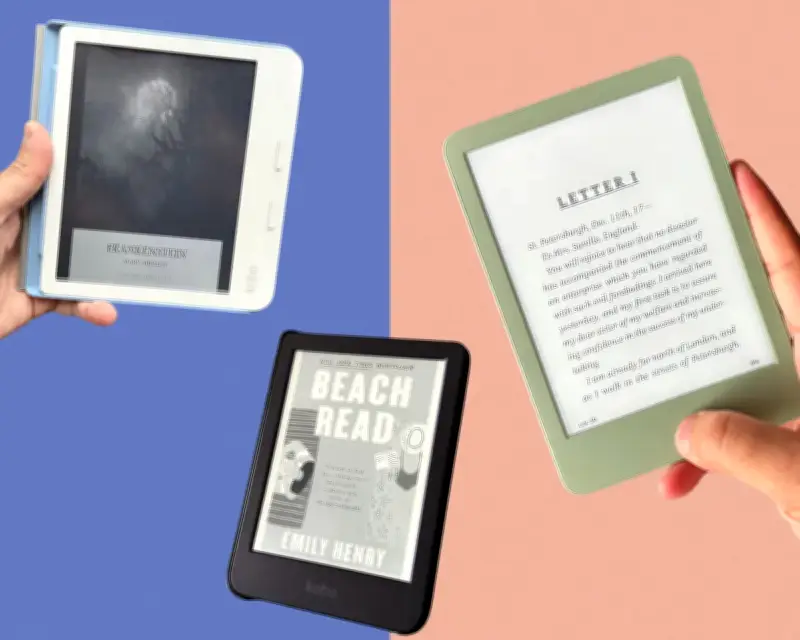
If you're looking for a new ebook reader, the Kobo Libra Colour is the best overall option in the US, with the Kobo Clara BW as the runner-up. We compared six popular models to help you decide which one belongs on your nightstand.
Best overall e-reader: Kobo Libra Colour
The Kobo Libra Colour is the best choice if you'd rather borrow books from your local public library than Amazon. It integrates directly with OverDrive, makers of the Libby app, which makes it the easiest way to download ebooks from your public library.
The Libra Colour has more fonts and font sizes to choose from than the Kindles tested, and it's possible to make subtler adjustments to the brightness and warmness. It also has physical buttons for turning pages, or you can tap and swipe on the screen. Dropbox and Google Drive integration make it painless to load your own books onto the e-reader. The Kobo stylus costs $70 and lets you highlight and take notes, which was great for PDFs that couldn't otherwise be edited on the device.

In addition to its OverDrive access, Kobo has a well-stocked bookstore of its own. There were only two titles on the test list that couldn't be found, and most of its ebook prices matched Amazon's. It's a shame that it costs so much, and its battery drained more quickly than some of the competition, though it still lasts at least a month. Key specs: 32GB storage, battery life up to 40 days, 7in display at 300 ppi for black-and-white content and 150 ppi for color content, and IPX8 waterproofing (up to 60 minutes in 6.5ft of fresh water). A cheaper alternative is the Kobo Clara Color, which omits physical buttons and stylus support but costs about $80 less.
Runner-up: Kobo Clara BW
The Kobo Clara BW can stay powered for weeks and survive an accidental dip. When submerged in a tub of tap water for 10 minutes, it remained completely functional. It has 16GB of storage, and the test unit was loaded with more than 180 PDFs with plenty of room to spare.
The battery life was impressive, and it charged quickly, getting up to 90% after 90 minutes. It outshines the budget Kindle because it can change color temperature, either manually or based on a schedule. It was equally easy to get library books from OverDrive or the Kobo bookstore. Its screen is a little dimmer compared with some of the larger 7in devices, and it lacks the buttons of the Kobo Libra Colour. Key specs: 16GB storage, battery life up to 53 days, 6in display at 300 ppi, and IPX8 waterproofing.
The most affordable Kindle: Amazon Kindle (11th Gen)
If you're already in the Amazon book club, Kindles are still great. The basic Kindle is now quietly more expensive than it used to be due to memory prices, but it's still a great black and white ebook reader. It's a portable way to read ebooks and access Amazon's seemingly endless supply of titles, which you can also read on your computer, phone or tablet through the Kindle app.
The Kindle delivers plenty of storage for all your ebooks. All 26 titles on the test list were found, and the Amazon shopping cart was the cheapest, although Barnes & Noble and Kobo had identical prices on most books. Its 6in screen was one of the smallest tested, but the text was crisp and easy to read, and it had no trouble surviving drop tests. This Kindle lacks the ability to change the color temperature from bluish white to a warmer yellow as bedtime approaches, and its battery life isn't as robust as some other options, but it should still last many weeks on a single charge. Key specs: 16GB storage, battery life up to six weeks, 6in display at 300 ppi, and not waterproof.
A fancier Kindle: Kindle Paperwhite Signature
The Signature version of the Kindle looks and feels premium. Flipping through pages feels the fastest on this device, and the touchscreen is smooth. If you want an e-reader that can zoom in close and still retain fine detail, this is a fantastic option. Its battery life is the best tested.
It is pricey, though. Wireless charging is one of the main features, besides its extra storage, that sets it apart from the cheaper Kindle Paperwhite, which is about $50 less. As with other Kindles, it's more difficult to get library books and load files on it compared with Kobos. Key specs: 32GB storage, battery life up to 12 weeks, 7in display at 300 ppi, and IPX8 waterproofing.

Best e-reader for kids: Amazon Kindle Colorsoft Kids
Amazon makes several child-geared Kindles. They're similar to their grown-up counterparts but usually come with a protective case, a longer warranty, and six or 12 months access to an Amazon Kids+ subscription. The Colorsoft is the favorite. A color screen makes sense for kids who devour picture books and graphic novels. While hues on books like You Are a Burst of Color are a little muted compared with a physical copy, the 7in screen still captures plenty of vibrant detail.
The Colorsoft has respectable storage and battery life, and the screen is responsive, making it easy to tap or swipe through pages. It can auto-adjust the light's warmth at sunset or based on your preferred schedule. It's quick and easy to toggle between kid mode and a typical Kindle, only requiring a four-digit code. Getting library books on a kid's Kindle isn't intuitive, and it's the priciest kid's model. If color isn't needed, the non-color Kindle Paperwhite Kids costs about $70 less. Key specs: 16GB storage, battery life up to eight weeks, 7in display at 300 ppi for black-and-white content and 150 ppi for color content, and IPX8 waterproofing.
If you want a big 8in screen: Nook GlowLight 4 Plus
The Nook 4 Plus has the largest screen (about 8in) of any e-reader tested, with the tradeoff being that it weighs a couple of ounces more. Barnes & Noble's digital bookstore is also almost perfect, lacking only a single ebook on the test list, and prices for Nooks are mostly the same as Amazon's Kindle line.
The overall experience of reading on the Nook can't compare with Kindle or Kobo devices, though. The screen is a bit laggier, especially with large PDFs, and it takes the most time and extra steps to get an ebook from the library onto the device. But if you want a large screen, it is still a good ebook reader. Key specs: 32GB storage, battery life up to three weeks, 7.8in display at 300 ppi, and IPX7 waterproofing (up to 30 minutes in 3ft of fresh water).
How the e-readers were tested
For more than a month, the six ebook readers were tested after researching many, using each for the same amount of time and putting them through the same tests. That included carrying them around in a backpack, knocking them off a nightstand, and even submerging the waterproof devices in water. Other factors such as battery life, charging time and extra features such as Dropbox integration were also evaluated.
To test content availability exhaustively, a list of 26 popular and more obscure books in a variety of genres was created, including mystery, romance, sci-fi and young adult. The books that were missing were noted, and the total cost to purchase them all was calculated. The time it took to get an ebook from a local library onto each device was also timed, and the devices were loaded with PDFs and epub files, with Bluetooth headphones connected to listen to audiobooks.
Most of all, reading was done on each device. Fiction and nonfiction, children's books, a graphic novel and scientific PDFs were all read. Each device was scored based on how easy it was to navigate, the options of changing fonts and layouts, and the brightness and crispness of the display. After the read-a-thon, the e-readers were returned to their manufacturers or donated to PCs for People, an organization that provides tech to families, individuals or nonprofits in need.
Frequently asked questions about e-readers
Can I just read on my phone? Yes, Libby, Kindle, Nook and other apps make it easy to get ebooks on your phone. However, e-readers use e-ink screens that mimic the look of paper and strain the eyes less than phone screens. Plus, having a dedicated device without notifications can make for a more distraction-free experience.
What's an ePub book? While ebooks come in a few file types, ePubs are among the most common. Kindles use Amazon's proprietary format, AZW files. Many e-readers also support PDF, DOC and TXT documents.
What's the best e-reader for library books? Based on testing, Kobo devices make it the easiest to browse and download public library books for free thanks to integration with OverDrive, which owns the Libby app. You can peruse titles directly on a Kobo, while Kindle readers require you to browse on your phone using the Libby app.
Do I need Adobe Digital Editions or Calibri to use an e-reader? It depends on the model. Adobe Digital Editions or Calibri weren't needed to get library books on the Kindles and Kobos tested, but both were needed for the Nook. Libby exported its ePubs as ACSM files, which require Adobe Digital Editions. Those had to be opened in that program to convert them to ePub files that could be loaded into the Nook. However, a MacBook didn't register when the Nook was connected. A program called Calibri, which converts ebook file formats, recognized the Nook, and ePub files could be transferred from the computer with no problem.
Do ebook readers work with audiobooks? Yes, most of the e-readers tested can play audiobooks. The catch is that you have to pair Bluetooth headphones or speakers – they don't have built-in speakers. Note: The Kobo Libra Colour cannot play audiobooks without Bluetooth headphones.
What's the best e-reader for highlighting? All the e-readers tested compiled highlights and listed them by chapter, and notes could be made tied to specific text. The Kobo Libra Colour works with a stylus, sold separately, that lets you write notes right on the page.
How much do ebooks cost? A search for 26 ebooks across the Amazon, Barnes & Noble and Kobo platforms found prices ranging from 99 cents to $30. Some were free to read with Kindle Unlimited or Kobo Plus. The average price was about $12. All the popular books chosen were available through the public library, but none of the obscure books were.
Can you read Kindle books on Kobo or vice versa? Books purchased from the Kindle, Barnes & Noble and Kobo stores come protected with Digital Rights Management (DRM), which prevents sharing. When an Amazon ebook was loaded on a Kobo, it showed up as gibberish. There are legally suspect ways around this, but they're not suggested.